
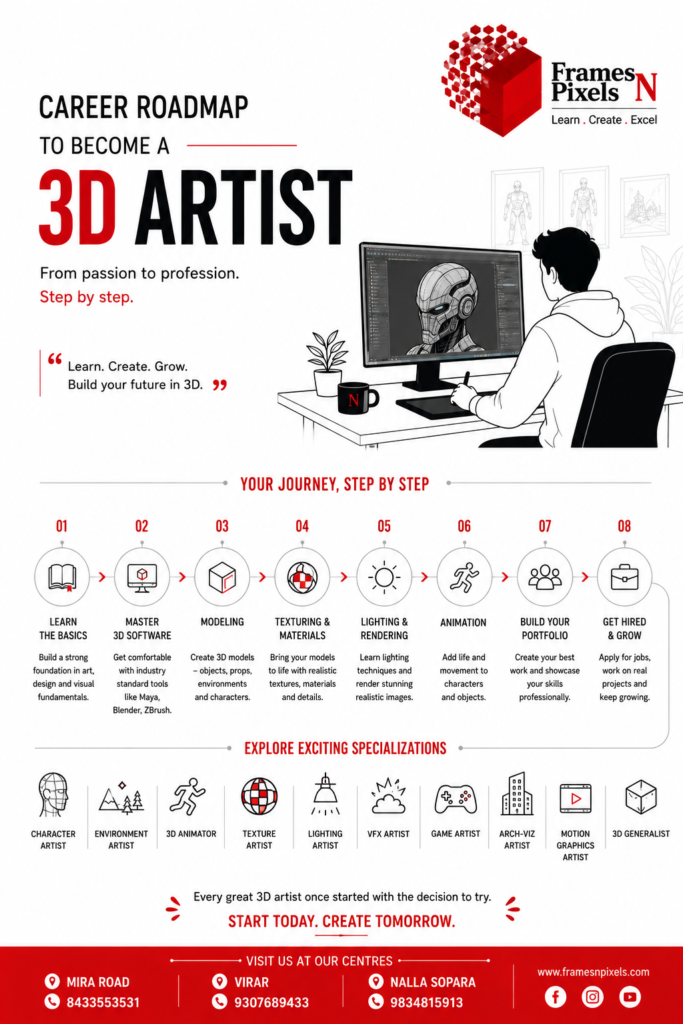
Want to become a 3D artist? Discover the step-by-step career roadmap covering modelling, texturing, lighting, animation, rendering, portfolios, software, specialisations and career opportunities.
Introduction
The world around us is increasingly visual and digital. From animated films and video games to VFX, advertising, architecture and virtual production, 3D artists are helping create the digital worlds we see every day.
If you enjoy drawing, design, technology, storytelling and creating things digitally, becoming a 3D artist can be an exciting career option.
But where do you start?
You don’t need to learn everything at once. A successful 3D career can be built step by step.
Here is a practical roadmap.
Step 1: Understand the Basics of Art and Design
Before jumping into complicated 3D software, develop a strong understanding of visual fundamentals.
Learn about:
- Perspective
- Proportion
- Composition
- Colour
- Lighting
- Form and shape
- Anatomy
- Visual storytelling
These fundamentals help you create believable and attractive 3D work.
Software can change, but strong artistic fundamentals remain valuable throughout your career.
Step 2: Learn 3D Software
The next step is to become comfortable with professional 3D software.
Popular tools include:
- Autodesk Maya – modelling, animation, rigging and production
- Blender – modelling, animation, sculpting, simulation and rendering
- 3ds Max – modelling, visualisation and architectural applications
- Cinema 4D – motion graphics and 3D design
- ZBrush – digital sculpting and detailed character work
You don’t need to master every application.
Start with one major 3D package and build a strong foundation before expanding your toolkit.
Step 3: Learn 3D Modelling
Modelling is one of the fundamental skills of a 3D artist.
A modeller creates digital objects and characters using polygons and other techniques.
Begin with simple objects:
Objects → Props → Environments → Characters
Learn concepts such as topology, edge flow, UVs and subdivision.
As your skills improve, move towards more complex models.
Step 4: Learn Texturing and Materials
A model without appropriate materials can look flat and unrealistic.
Texturing gives surfaces their visual characteristics.
You should learn how to create materials such as:
- Metal
- Wood
- Glass
- Plastic
- Fabric
- Skin
- Stone
Understanding how light interacts with different materials is equally important.
Tools such as Substance 3D Painter can also be useful for professional texturing workflows.
Step 5: Understand Lighting
Lighting can completely change the appearance of a 3D scene.
Learn how to use:
- Key lights
- Fill lights
- Rim lights
- Natural lighting
- HDRIs
- Atmospheric effects
A good 3D artist doesn’t simply create objects—they understand how to present those objects visually.
Lighting skills are particularly important for animation, VFX, architectural visualisation and advertising.
Step 6: Learn Rendering
Rendering converts your 3D scene into a finished image or sequence.
Depending on your specialisation, you may encounter rendering technologies and engines such as:
- Arnold
- V-Ray
- Corona
- Redshift
- Cycles
- Unreal Engine
Don’t worry about learning everything immediately.
First understand the fundamentals of cameras, lighting, materials, render settings and image quality.
Step 7: Explore Animation
If you enjoy movement and storytelling, animation can be a natural next step.
Learn:
- Keyframe animation
- Timing
- Spacing
- Weight
- Character movement
- Facial animation
- Body mechanics
- Acting
Understanding the principles of animation can turn a technically correct 3D model into a believable character or performance.
Step 8: Learn Rigging if You Enjoy Technical Work
Characters often need digital skeletons and controls before they can be animated.
This process is called rigging.
Rigging involves creating systems that allow animators to control:
- Body movement
- Facial expressions
- Hands
- Feet
- Spine
- Character deformation
Rigging is more technical than many other areas of 3D, making it a good specialisation for people who enjoy both art and problem-solving.
Step 9: Choose Your Specialisation
As you progress, you don’t necessarily need to remain a generalist.
You can specialise in an area that matches your interests.
Character Artist
Creates digital characters for films, games and animation.
3D Animator
Brings characters and objects to life.
Environment Artist
Creates buildings, landscapes and digital worlds.
3D Modeler
Creates detailed objects, props and assets.
Texture Artist
Creates realistic surface materials and textures.
Lighting Artist
Designs lighting for digital scenes.
VFX Artist
Creates simulations, effects and digital environments.
Architectural Visualisation Artist
Creates realistic 3D representations of buildings and interiors.
Game Artist
Creates assets and environments for interactive experiences.
Motion Graphics Artist
Combines design, animation and 3D for advertising, branding and digital media.
Choosing a specialisation doesn’t mean you stop learning other areas. A broad understanding combined with one strong specialisation can make you particularly valuable.
Step 10: Learn Real-Time 3D
Game engines are becoming increasingly important beyond gaming.
Technologies such as Unreal Engine are being used for:
- Games
- Virtual production
- Film
- Architecture
- Automotive visualisation
- Training
- Immersive experiences
Learning real-time 3D can therefore expand the number of industries in which you can work.
For today’s students, understanding both traditional 3D production and real-time workflows can be a significant advantage.
Step 11: Start Working on Projects
This is one of the most important stages of your development.
Don’t spend months learning software without creating anything.
Build projects.
For example:
Beginner: Create a simple room.
Intermediate: Create a complete interior scene.
Advanced: Create a photorealistic environment with lighting, materials and animation.
For character artists, create a character from concept to final render.
For animators, create short animation sequences.
For game artists, create a small game-ready environment.
Every project gives you something new to learn.
Step 12: Build a Professional Portfolio
A portfolio is your visual resume.
Instead of showing everything you have ever created, show your best work.
A good 3D portfolio should demonstrate:
- Technical ability
- Artistic understanding
- Creativity
- Attention to detail
- Problem-solving
- Consistency
If possible, show the development process as well as the final result.
For example:
Concept → Modelling → Texturing → Lighting → Final Render
This helps employers understand how you work.
Step 13: Work on Live Projects
There is a major difference between completing an assignment and completing work for a real client.
Live projects teach you about:
- Deadlines
- Feedback
- Revisions
- Client requirements
- Teamwork
- Quality standards
- Production workflows
This experience can make the transition from student to professional much easier.
Learning through practical projects is particularly valuable in creative careers because employers ultimately need people who can apply their skills in real production environments.
Step 14: Learn Communication and Professional Skills
A great artist still needs to communicate.
Develop your ability to:
- Explain your ideas
- Understand briefs
- Accept feedback
- Work with teams
- Meet deadlines
- Present your work professionally
Creative production is rarely a completely individual activity.
Large projects involve designers, artists, animators, directors, producers and technical teams working together.
Step 15: Learn AI and New Creative Technologies
Artificial Intelligence is becoming part of many creative workflows.
AI can assist with:
- Concept development
- Reference generation
- Ideation
- Texture workflows
- Animation assistance
- Production automation
However, AI doesn’t replace the need for artistic understanding.
A professional still needs to know what looks right, what tells the story effectively, and how to turn an idea into a finished production asset.
Learning AI alongside traditional 3D skills can help future artists adapt to changing workflows.
Step 16: Look for Your First Opportunity
Once you have skills and a portfolio, start looking for professional opportunities.
You can explore:
- Animation studios
- VFX companies
- Gaming companies
- Advertising agencies
- Architectural firms
- Design studios
- Production houses
- Freelance platforms
Your first position may be a junior role.
That’s perfectly normal.
Your first job is an opportunity to learn how professional production works.
The Career Growth Path
A 3D artist’s career can evolve in many directions.
A typical path might look like:
Student
↓
Junior 3D Artist
↓
3D Artist
↓
Senior Artist
↓
Lead Artist
↓
Art Director / Creative Director
Alternatively, you might move into freelancing or entrepreneurship:
Student → Freelancer → Small Team → Creative Studio Owner
Your career doesn’t have to follow one fixed path.
How Long Does It Take to Become a 3D Artist?
There is no universal timeline.
Some students can develop employable skills relatively quickly, while others take longer depending on their specialisation, practice and previous experience.
The important factor isn’t simply the number of months spent learning.
It is the amount of deliberate practice and meaningful project work you complete.
Someone who spends six months actively creating projects may progress further than someone who spends two years only watching tutorials.
Degree or Skills?
A common question students ask is whether they need a degree.
The answer depends on the career and employer.
In many creative roles, practical ability and portfolio quality are extremely important.
However, a recognised degree can provide additional advantages, including academic progression and broader career flexibility.
For many students, the strongest approach is:
Degree + Professional Skills + Live Projects + Portfolio
This gives students both formal education and practical industry preparation.
Summary
Becoming a 3D artist is not about mastering every software package. Frames N Pixels is a nice place to start your journey in becoming a 3d Artist https://www.arenavirar.com
It is about developing a combination of artistic ability, technical knowledge, creativity, storytelling, problem-solving and professional experience.
Start with the fundamentals.
Learn one 3D package properly.
Create projects.
Experiment.
Build your portfolio.
Work on live assignments.
Explore different specialisations.
Learn real-time 3D and AI tools.
And most importantly, keep practising.
The journey may begin with a simple 3D model on your computer.
With consistent learning and the right opportunities, that first model can become the beginning of a career in Animation, VFX, Gaming, Advertising, Architecture, Virtual Production or 3D Design.
Don’t wait to become an expert before you start creating.
Start creating—and become an expert along the way.
References
- Autodesk – 3D Animation: The Ultimate Animation Guide
Covers the skills required for 3D animation, the animation pipeline, software, portfolios, specialisations, networking and emerging technologies.
Autodesk – 3D Animation Guide - Autodesk – 3D Animation Software
Explains the major components of 3D production, including modelling, rigging, animation, texturing, lighting, VFX and motion capture.
Autodesk – 3D Animation Software - Autodesk Maya – Features and Capabilities
Useful reference for modelling, rigging, animation, simulation, look development, rendering and professional 3D production workflows.
Autodesk Maya – Features - Unreal Engine – Students & Schools
Provides career guidance for students interested in 3D careers and highlights opportunities across gaming, film, television, architecture, automotive and other industries.
Unreal Engine – Students & Schools - Unreal Engine – The First Year Out: Moving from Student to 3D Artist
Offers practical insights from artists transitioning from education into careers in game development, VFX and immersive media, including the importance of portfolios and documenting project processes.
Unreal Engine – Moving from Student to 3D Artist - Unreal Engine – What Is a 3D Animator?
Explains the role of a 3D animator, career progression and the importance of a targeted portfolio or demo reel.
Unreal Engine – What Is a 3D Animator? - Unreal Engine – What Is an Environment Artist?
Provides useful guidance on environment-art careers, portfolio development, project selection and the skills employers look for.
Unreal Engine – What Is an Environment Artist? - Autodesk – Breaking into 3D Animation
A real-world career story illustrating how continuous learning, personal projects, networking and practical experience can help an artist progress in the industry.
Autodesk – Breaking into 3D Animation